Start here
The buying order that works
Buy a smart plug first, a sensor second, and the hub third. Most people do it backwards, spend $200 on a hub, and discover their household actually wanted two lamps on a timer.
The order matters more than the brand. Each rung teaches you something that changes what you buy next, and the cheap rungs teach the expensive lessons. Somebody who buys a lock first learns nothing except that locks are expensive.
| Order | Buy | Our pick | Why this rung |
|---|
| 1 | A smart plug | TP-Link Tapo P110M | The cheapest rung. Proves whether you like this at all, and stays useful forever as a lamp or fan switch. |
| 2 | A motion or contact sensor | Aqara Motion & Contact Sensors | The first device that makes something happen without you asking. This is where it stops being a gadget. |
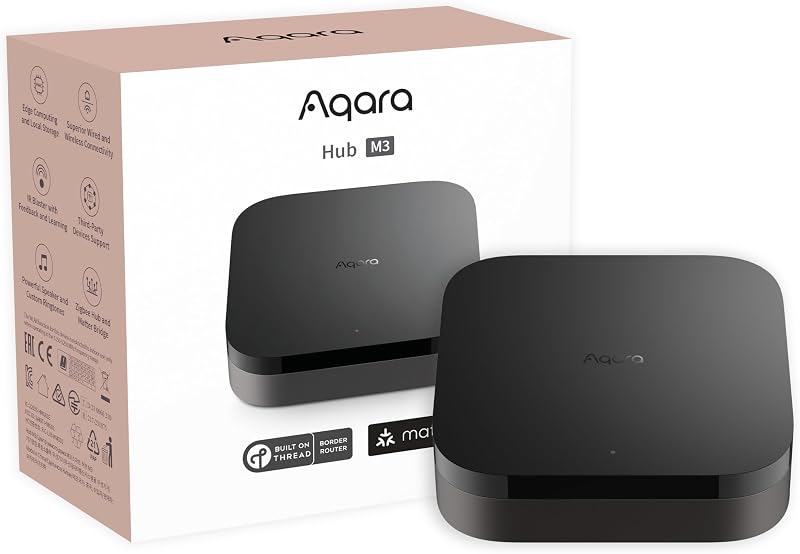
| 3 | A hub or border router | Aqara Hub M3 | Buy this third, not first. By now you know which platform the household actually uses. |
| 4 | Lighting | Philips Hue Starter Kit | The most-used automation in every home. Decide bulbs versus switches before spending. |
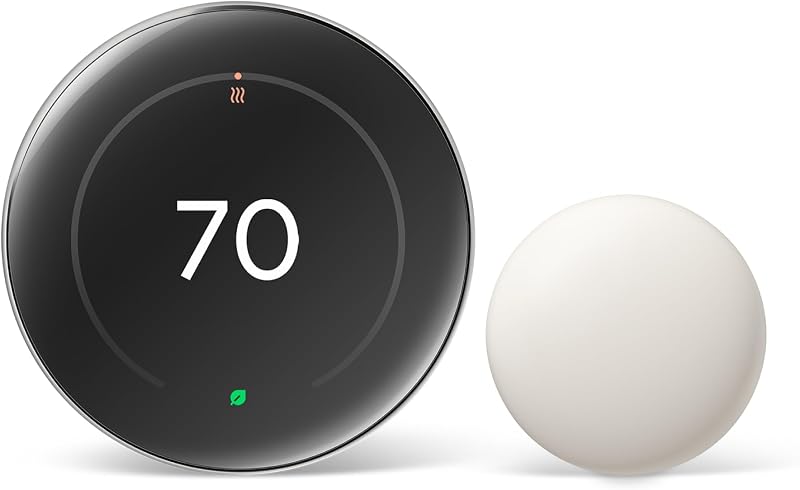
| 5 | A thermostat | Nest Learning Thermostat (4th Gen) | The only device here that pays for itself. Check HVAC compatibility before ordering. |
| 6 | Door and camera | Aqara Smart Lock U400 | Last, because it is where the money and the privacy questions are. |
The one rule underneath all of thisCheck which network a device speaks before you check what it does. A Thread device without a border router is an ornament. A Wi-Fi device is fine until you own forty of them. Every card below carries the protocol tag for that reason.
Networks
Matter, Thread, Zigbee, Wi-Fi, Z-Wave
Matter is the compatibility layer, Thread and Zigbee are low-power meshes that keep working offline, Wi-Fi needs no hub but does not scale, and Z-Wave is the long-range option common in security gear.
These five words explain nearly every smart home frustration. A device dropping offline every few days is usually Wi-Fi congestion. A device that stops responding during an outage is usually cloud-dependent. A device that refuses to appear in your app is usually waiting for a hub nobody mentioned on the box.
| Network | Needs a hub? | Works offline? | Typical devices | The catch |
|---|
| Matter | Depends on transport | Depends on transport | Plugs, bulbs, locks, thermostats | Matter is a language, not a network. It still runs over Wi-Fi or Thread. |
| Thread | Border router | Yes | Sensors, locks, plugs | Needs at least one border router. Many homes already have one. |
| Zigbee | Coordinator | Yes | Cheap sensors, bulbs | Fifteen years of cheap hardware, but tied to its hub. |
| Wi-Fi | No | Usually not | Cameras, plugs, vacuums | One IP address each. Fine at five devices, painful at fifty. |
| Z-Wave | Controller | Yes | Locks, security sensors | Separate band, good range, fewer cheap devices. |
The full protocol comparison →
01
Hubs & Bridges
Get the Aqara Hub M3 if the house is split between iPhones and Pixels, or Zigbee sensors are already on the walls. One box speaks Matter, Thread, Zigbee and IR, so every platform sees the same devices.
Best Overall
Aqara Hub M3
Matter
A mixed household where someone has an iPhone, someone has a Pixel, and there are already Zigbee sensors on the wall.
AlexaYes
GoogleYes
AppleYes
SmartThingsYes
- Protocols
- Matter, Thread, Zigbee, IR
- Hub
- Thread border router
- Local
- On-device automation
- Power
- USB-C / PoE option
- Thread border router, Zigbee coordinator and Matter controller in one box, so one purchase ends the protocol argument.
- Automations run on the device rather than in a cloud account, which means the lights still work when the internet does not.
- Pairs into Apple Home, Google Home, Alexa and SmartThings from the same QR code — it does not make you pick a side.
Skip this ifyour home is entirely Apple and you already own an Apple TV 4K, you have a Thread border router already. Skip this.
Samsung SmartThings Station is the better fit for someone who wants a hub but resents paying hub money for it. For anyone who has already hit the wall where a brand app refuses to do the one automation they want, look at the Home Assistant Green instead. Full reasoning on the hubs & bridges page.
All hubs & bridges picks →
02
Speakers & Displays
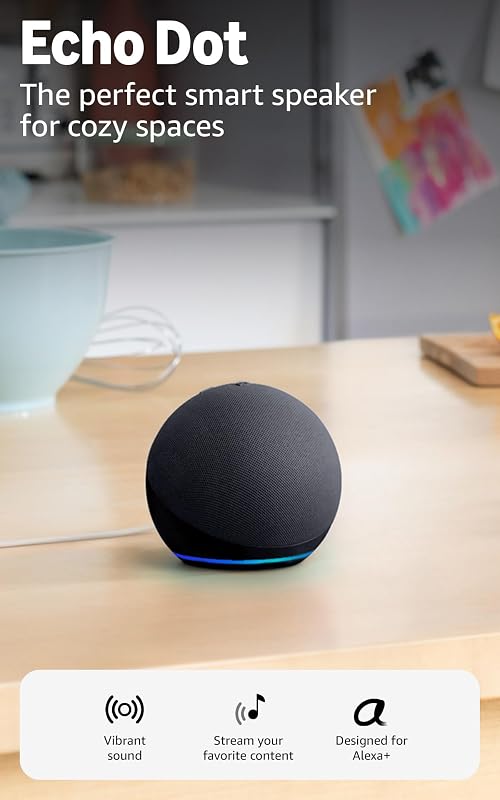
Start with the Amazon Echo Dot (5th Gen) to find out whether anyone in the house actually uses voice control, before you commit to an ecosystem.
Cheapest Way In
Amazon Echo Dot (5th Gen)
Wi-Fi
Finding out whether you actually want voice control before committing to an ecosystem.
AlexaYes
GoogleNo
AppleNo
SmartThingsNo
- Assistant
- Alexa
- Audio
- 1.73" driver
- Sensors
- Temperature, motion
- Hub
- No Thread
- It is the cheapest device on this entire site that changes how a room works, and it goes on sale constantly.
- The built-in temperature sensor can trigger routines, which turns a speaker into a cheap climate sensor.
- Three of them scattered around a flat cost less than one smart lock and solve the 'I shouted and nothing happened' problem.
Skip this ifIt is not a Thread border router and it is Alexa-only. If you want one device to also be the hub, buy an Echo Hub or the Aqara M3.
For a nightstand or a kitchen counter where you want a clock, a timer and a camera feed without a phone, look at the Amazon Echo Show 5 (3rd Gen) instead. The Amazon Echo Show 8 (2025) suits a kitchen counter or a hallway where the screen will actually be read: recipes, a camera feed, the family calendar. Full reasoning on the speakers & displays page.
All speakers & displays picks →
03
Smart Plugs
The TP-Link Tapo P110M is the first smart home device most people should buy, and the one they end up buying four more of. It joins your Wi-Fi through Matter, so it needs no hub.
Best Smart Plug
TP-Link Tapo P110M
Matter
The first smart home purchase anybody should make, and the one they end up buying four more of.
AlexaYes
GoogleYes
AppleYes
SmartThingsYes
- Protocol
- Matter over Wi-Fi
- Monitoring
- Per-device energy
- Size
- Compact, single socket
- Hub
- None needed
- Matter certified over plain Wi-Fi, so it works on all four platforms without a hub, a bridge or a border router.
- Energy monitoring per socket turns 'is the old fridge expensive' from a guess into a number.
- Small enough that it does not block the second socket, which sounds trivial until you own one that does.
Skip this ifWi-Fi plugs each take an IP address. Past roughly thirty devices, move to Thread or Zigbee plugs instead.
The Eve Energy (Matter) suits an Apple household that wants nothing phoning home and no extra app account. Consider the Amazon Smart Plug for an Alexa household that wants one lamp or fan on a routine and no second app on the phone. Full reasoning on the smart plugs page.
All smart plugs picks →
04
Lighting
For lighting that behaves the same in every room for years, buy the Philips Hue Starter Kit. Its bridge keeps the bulbs off your Wi-Fi, which is why Hue setups stay dependable as they grow.
Best Lighting System
Philips Hue Starter Kit
Zigbee
Anyone who wants lighting that behaves identically in every room, every time, for the next decade.
AlexaYes
GoogleYes
AppleYes
SmartThingsYes
- Protocol
- Zigbee via bridge
- Color
- 16M + white range
- Scale
- 50 bulbs per bridge
- Extras
- Motion, dimmer switches
- The bridge runs the bulbs on Zigbee rather than your Wi-Fi, which is why Hue setups stay reliable at a scale where Wi-Fi bulbs fall apart.
- The ecosystem is the point: dimmer switches, motion sensors and wall modules all speak the same system.
- Ten years of firmware support behind it. Most smart lighting brands have not existed that long.
Skip this ifIt is the expensive option per bulb. For two lamps in a rented flat, Matter Wi-Fi bulbs cost a third as much.
Consider the Nanoleaf Essentials A19 (Thread) for adding color light to a Thread home without running a second bridge. Lutron Caséta Dimmer Kit is the better fit for a house where other people — guests, kids, a partner who hates this hobby — have to be able to turn the lights on. Full reasoning on the lighting page.
All lighting picks →
05
Thermostats
If the house runs on a regular-ish routine and the heating bill is worth attacking, the Nest Learning Thermostat (4th Gen) is the one to fit.
Best Thermostat
Nest Learning Thermostat (4th Gen)
Matter
A home with a regular-ish routine and a heating bill worth attacking.
AlexaYes
GoogleYes
AppleYes
SmartThingsNo
- Display
- Large round LCD
- Learning
- Auto-schedule
- Sensors
- 1 remote sensor in the box
- Protocol
- Matter certified
- Matter certification is new for this generation, which is what finally lets an Apple Home household buy a Nest.
- Remote temperature sensors fix the single biggest complaint about every thermostat: the hallway is not the bedroom.
- It builds a schedule by watching, which matters because almost nobody ever programs a thermostat by hand.
Skip this ifIt runs most 24 V systems, usually without a C-wire, but not line-voltage baseboard heat. Run Google's compatibility checker before ordering.
ecobee Smart Thermostat Premium is the better fit for someone who wants the thermostat to also be the air quality monitor and the hallway speaker. For a rental, a second property, or anywhere the thermostat needs to be smart but not clever, look at the Amazon Smart Thermostat instead. Full reasoning on the thermostats page.
All thermostats picks →
06
Video Doorbells
No doorbell wiring, and parcels that keep going missing? The Ring Battery Doorbell Pro runs on a rechargeable battery, so nothing needs wiring.
Best Video Doorbell
Ring Battery Doorbell Pro
Wi-Fi
A front door with no existing doorbell wiring and a package problem.
AlexaYes
GoogleNo
AppleNo
SmartThingsNo
- Video
- Head-to-toe view
- Motion
- 3D motion detection
- Power
- Battery or wired
- Storage
- Subscription for history
- The head-to-toe aspect ratio is the one that shows the parcel on the doorstep rather than the top of the delivery driver's head.
- 3D motion detection cuts down the 'a car drove past' notifications that make people turn alerts off entirely.
- Battery means no electrician, which is the actual barrier for most renters and flats.
Skip this ifVideo history needs a Ring subscription. If recurring fees are a dealbreaker, look at a doorbell with local storage.
For a Google household with existing doorbell wiring that wants the door in the same app as everything else, look at the Nest Doorbell (Wired, 3rd Gen) instead. The Aqara Video Doorbell G4 suits anyone whose objection to video doorbells is the monthly fee. Full reasoning on the video doorbells page.
All video doorbells picks →
07
Smart Locks
For a front door used by people with different phones, the Aqara Smart Lock U400 covers everyone: Apple Home Key, fingerprint, keypad and a physical key.
Best Smart Lock
Aqara Smart Lock U400
Thread
A main entrance in a household where not everyone carries the same brand of phone.
AlexaYes
GoogleYes
AppleYes
SmartThingsNo
- Protocol
- Matter over Thread
- Entry
- Fingerprint, keypad, Home Key
- Keyhole
- Physical key retained
- UWB
- Hands-free unlock on supported phones
- Apple Home Key plus a fingerprint reader plus a keypad plus a physical key covers every member of a household including the one who refuses apps.
- Matter over Thread means it answers to all three major platforms rather than one.
- Ultra-wideband lets it unlock as a supported phone approaches, with no tap and no code, which is the feature that turns a smart lock from a gadget into a habit.
Skip this ifMost of the good features need a Thread border router in range of the door. Confirm coverage first.
The Schlage Encode Plus suits a door where the lock being a good lock matters more than it being a good gadget. Consider the Yale Assure Lock 2 for a front door where you want a keypad now and are not ready to commit to a platform, a hub or a monthly anything. Full reasoning on the smart locks page.
All smart locks picks →
08
Security Cameras
To watch a side gate, garage or hallway without starting a monthly bill, the TP-Link Tapo C120 is the camera to buy.
Best Cheap Camera
TP-Link Tapo C120
Wi-Fi
Covering a side gate, a garage or a hallway without starting a monthly bill.
AlexaYes
GoogleYes
AppleNo
SmartThingsNo
- Video
- 2K
- Rating
- IP66 indoor/outdoor
- Storage
- microSD local, free
- Night
- Color night vision
- Local microSD recording with no subscription, at a price where buying three is a normal decision.
- IP66 means the same camera works indoors and out, so you do not have to decide at purchase time.
- 2K is enough to read a face at doorstep distance, which is the only resolution question that matters.
Skip this ifNo Apple Home support and no cloud backup. If a thief takes the camera, the card goes with it.
Consider the Wyze Cam v4 for a porch, driveway or garage where a light and a siren that fire on motion are worth more than a sharper picture. Full reasoning on the security cameras page.
All security cameras picks →
09
Robot Vacuums
Hard floors and rugs, and nobody keen to empty a bin every few days? Get the Roborock Q Revo. The dock does the dirty work.
Best Robot Vacuum
Roborock Q Revo
Wi-Fi
A home with both hard floors and rugs where nobody wants to empty a bin every three days.
AlexaYes
GoogleYes
AppleNo
SmartThingsNo
- Dock
- Auto-empty, auto-wash
- Mopping
- Dual spinning pads
- Mapping
- LiDAR
- Carpet
- Mop lift
- The dock empties the bin and washes the mop pads, which is what turns a robot vacuum from a chore into an appliance.
- LiDAR mapping handles multi-room layouts and no-go zones properly rather than bouncing off furniture.
- Mop lift over carpet is the feature that makes a single machine viable in a mixed-floor house.
Skip this ifThe dock is large and needs a permanent spot near a socket. In a small flat, a dockless model may fit better.
Dreame L60 Ultra is the better fit for mixed-floor homes where corners and edges are what the last robot missed. Full reasoning on the robot vacuums page.
All robot vacuums picks →
10
Sensors
The Aqara Motion & Contact Sensors are the unglamorous layer that makes everything else automatic instead of voice-operated. Buy them second, right after a plug.
Best Sensor Family
Aqara Motion & Contact Sensors
Zigbee
The unglamorous layer that makes everything else automatic instead of voice-operated.
AlexaYes
GoogleYes
AppleYes
SmartThingsYes
- Types
- Motion, door/window, light, vibration
- Battery
- 1–2 years typical
- Hub
- Aqara hub or Zigbee coordinator
- Size
- Very small
- These are the cheapest devices in a smart home and they do most of the actual automating — lights that come on because you walked in, not because you asked.
- Battery life is measured in years, so a dozen of them is not a dozen maintenance tasks.
- Small enough to sit on a door frame without anyone noticing, which matters more than the spec sheet suggests.
Skip this ifThey need an Aqara hub or another Zigbee coordinator. Hubless? Buy Thread sensors instead and check border router coverage.
All sensors picks →
11
Blinds & Curtains
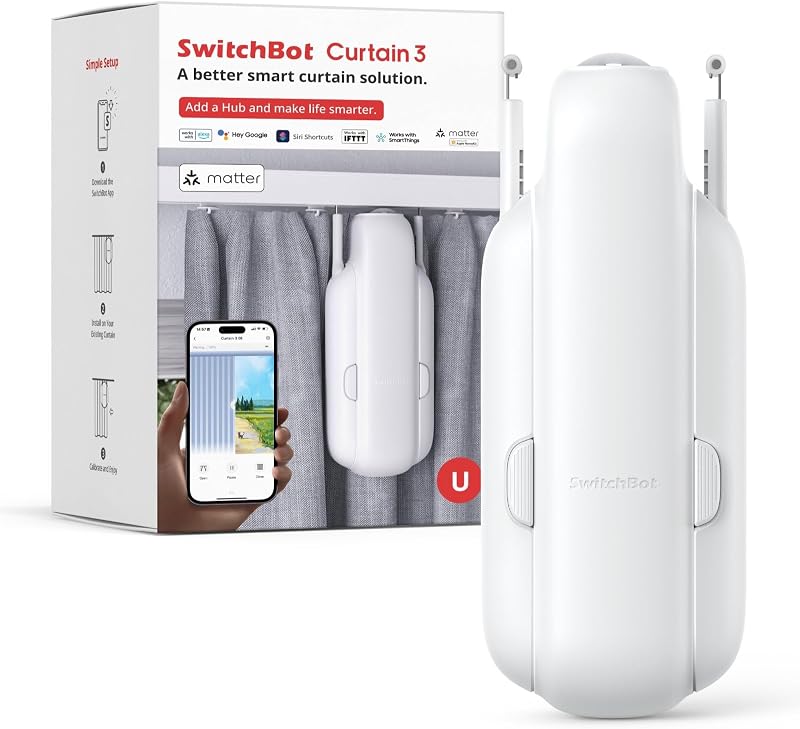
Renting, or happy with the curtains you already have? The SwitchBot Curtain 3 automates them without replacing anything.
Best Retrofit Motor
SwitchBot Curtain 3
BluetoothMatter via SwitchBot Hub
Renters and anyone who does not want to replace perfectly good curtains to automate them.
AlexaYes
GoogleYes
AppleYes
SmartThingsYes
- Fit
- Clips onto existing rail
- Power
- Battery; solar panel sold separately
- Platforms
- Need a SwitchBot Hub (sold separately)
- Noise
- Quiet mode
- It clips onto the curtain you already own, so this is the only automation here that leaves no trace when you move out.
- An optional solar panel, sold separately, keeps it charged on a sunny window and removes the recharging chore.
- Opening the bedroom curtains on a sunrise schedule is the one automation that most people keep using after the novelty wears off.
Skip this ifHeavy blackout curtains on a stiff rail will defeat it, and on its own it only talks Bluetooth to a phone nearby: Alexa, Google, Apple Home and control away from home all need a SwitchBot hub.
All blinds & curtains picks →
12
Water & Safety
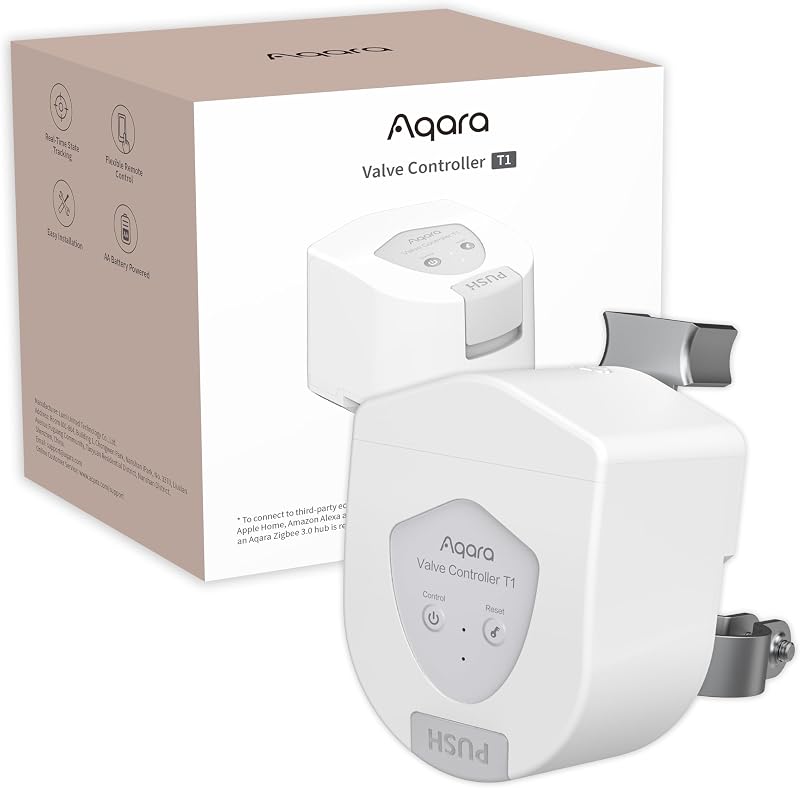
If a washing-machine hose has ever burst on you, or you would rather it never does, install the Aqara Smart Valve Controller T1.
Best Leak Shutoff
Aqara Smart Valve Controller T1
ZigbeeMatter via Aqara hub
Anyone who has had a washing machine hose fail, and everyone who has not yet.
AlexaYes
GoogleYes
AppleYes
SmartThingsYes
- Fits
- 1/2, 3/4, 1 in; lever or butterfly
- Install
- Clamps on, no pipe work
- Hub
- Aqara Zigbee 3.0 hub required
- Power
- AA batteries, up to 2 years per listing
- It clamps onto the valve you already have rather than being plumbed in, so there is no plumber and no insurance question.
- Paired with an Aqara leak sensor under the washer, it closes the valve on its own and sends a notification, so a burst hose becomes a wet floor rather than a ruined one.
- Through the Aqara hub it appears in Apple Home, Google Home, Alexa and SmartThings via Matter, so the shutoff can sit inside whatever app the house already uses.
Skip this ifIt needs an Aqara Zigbee hub — the M3 or the M100 — and the listing says it is not for outdoor valves. No Aqara hub and no plan to buy one? Look at a plumbed-in shutoff instead.
All water & safety picks →
Parts
The cheap parts that do the work
Nobody writes roundups about these, which is why most smart homes are missing two of them. Most cost about as much as a takeaway.
| Part | Why it matters | |
|---|
| Matter Wi-Fi bulbs (multipack)Current pick: Linkind Matter A19, 2-pack | The cheap way to light a rented flat. No hub, no bridge — but check the box says Matter, not just 'works with Alexa'. | See options |
| Water leak sensorsCurrent pick: Tapo T300 — needs a Tapo hub, cannot trigger the Aqara valve | Under the washer, under the sink, next to the water heater. The cheapest insurance in this entire category. | See options |
| Thread border routerNo standalone pick — a good hub already is one | Half the devices on this site want one. If you own an Apple TV 4K, a HomePod mini, a Nest Hub or an Echo with Thread, you already have it. | See hubs that include one |
| Smart switch / dimmerCurrent pick: Kasa HS220 dimmer, 3-pack — needs a neutral wire | The upgrade that keeps a house usable for guests. Check for a neutral wire in the box before ordering. | See options |
| Smart power stripCurrent pick: Kasa HS300, six switched sockets | Individually switched sockets behind a TV or a desk. One device, six automations, one IP address. | See options |
| Display standCurrent pick: Echo Show 5 (3rd Gen) Adjustable Stand | Tilts the Show 5 toward you and adds a 7.5 W USB-C port for a phone or earbuds. Made for the 3rd-gen Show 5 only. | See options |
Watching
Also worth watching
These show up constantly in other 2026 roundups and are not on the list above, either because they are too new to have a review history or because they solve a narrower problem. They are here so you know they were considered rather than missed.
| Device | Why it is interesting | |
|---|
| Aqara Hub M100 | A USB-powered Matter controller and Thread border router. Handles up to 20 Aqara Zigbee and 20 Thread devices, but not third-party Zigbee — the cheap way into Thread, not a whole-house hub. | Check |
| Amazon Echo Hub | Amazon's wall-mounted control panel, with a Thread border router and Zigbee built in. For Alexa-and-Ring households that want a screen on the wall rather than a phone in the hand. | Check |
| Roborock Saros 10R | The flagship with the retrieving arm. Shows where the category is going, at a price almost nobody should pay yet. | Check |
| Hubitat Elevation C-8 Pro | Local-first hub with Z-Wave 800 long range. The answer when Home Assistant is too much work and SmartThings is too cloudy. | Check |
Avoid
Five expensive mistakes
- Buying the hub first. It is the most expensive way to discover which platform your household prefers. Buy a $20 plug and find out for a twentieth of the price.
- Reading "works with Alexa" as "works with everything". That phrase means exactly one platform. The word to look for is Matter.
- Buying Thread devices without a border router. They will pair over Bluetooth, behave oddly, and drop out. Check what you own first — an Apple TV 4K or a Nest Hub already counts.
- Putting forty Wi-Fi devices on a consumer router. It works until it does not, and the failure looks like random dropouts that are impossible to diagnose. Past roughly thirty devices, move sensors to Thread or Zigbee.
- Buying a camera without checking where footage goes. Some record locally for free. Some show you nothing older than a few seconds without a subscription. The price on the listing is not the price.
One more, for locks specificallyFind out what happens when the batteries die before you buy, not after. Some locks take an external battery jump. Some keep a keyhole. Some leave you outside.
Questions
Smart home devices, answered plainly
What are smart home devices?
Any household device that can be controlled or automated over a network — a plug, a bulb, a lock, a thermostat, a camera. The useful dividing line is not what it does but which network it speaks: Wi-Fi, Thread, Zigbee or Z-Wave. That one fact decides whether it needs a hub, whether it keeps working offline, and how many of them your home can hold.
What smart home device should I buy first?
A smart plug. It is the cheapest device on this page, needs no hub, and works on every platform if it says Matter on the box. If you enjoy using it, the ladder above shows what to add next. If you forget it exists within a month, you have learned something for the price of a takeaway.
Do I need a smart home hub?
Not for Wi-Fi and Matter-over-Wi-Fi devices. You do need one — specifically a Thread border router — for Thread devices, and a Zigbee coordinator for Zigbee sensors. Many people already own a border router without knowing: an Apple TV 4K, a HomePod mini, a Nest Hub and several Echo models all qualify.
What is Matter, and does it matter?
Matter is a standard that lets a device work with Alexa, Google Home, Apple Home and SmartThings at the same time rather than picking one. It is worth insisting on for anything you expect to own in five years. Note that a box saying “works with Alexa” is not the same claim.
Will my smart home still work if the internet goes down?
It depends entirely on the device. Thread and Zigbee devices paired to a hub that runs automations locally will keep working. Most Wi-Fi devices that route through a manufacturer cloud will not. Every card on this site carries the protocol tag for exactly this reason.
How much does a basic smart home cost?
Less than most people expect, if you buy in order. A Matter plug, two sensors and a cheap speaker together cost less than one good smart lock. Lighting and a thermostat are the next step up. Locks, cameras and robot vacuums are where it stops being cheap, which is why they sit at the bottom of the buying order rather than the top. Prices move weekly, so every button here opens the live listing instead of quoting a number.
Method
How these picks are made
I do not own these devices, and nothing here is written as though I had tested one. Every entry is built from four things: the manufacturer's published specification rather than the listing headline, the live Amazon listing for rating and box contents, owner complaints that repeat across forums and one-star reviews, and independent lab testing where it exists, named as theirs.
What ranks a device up: it works on more than one platform, it keeps working when the internet does not, and it arrives without a second purchase hidden in the setup guide. What ranks a device down: a subscription required to use the feature it was sold on, a cloud account in the critical path of a light switch, and a protocol with no future.
There are no invented test figures anywhere on this site. If you find a number that reads like a measurement and carries no source, tell me and it comes down.

Quiet SwitchOne person, no sponsors, no devices owned. Specs cited, protocols labeled on every card, and the catch written next to the recommendation rather than buried under it. How this site works →